NEW
NEW RESEARCH
AI Spend Report: See how 172 leaders are budgeting for AI Get the report
WEBINAR
AI Spend in 2026: What finance should do next Watch now


Finance teams are using AI for AP invoice coding to replace manual data entry with a review-and-approve workflow. And they’re paying less for it than they would for temporary staff.
That’s the solution we heard when we interviewed 30+ CFOs for SpendHound's 2026 CFO AI Report. During our conversations, the headache of coding invoices came up repeatedly. That wasn’t a surprise. Everyone in finance knows that AP invoice coding is one of the most persistent bottlenecks — both because of how labor intensive it is and because it never stops. Every invoice requires the same steps, the same lookups, the same data entry. The volume adds up fast.
Some teams absorb the workload internally. Others hire temporary staff during peak periods just to keep pace. While invoice coding is an absolutely essential task, nobody we spoke with thought manual invoice coding was the best use of their team's time.
That’s where AI comes in. CFOs told us how they are using AI to automate the repetitive parts of the workflow while keeping humans in the loop for review and approval.
Here’s what this looks like in practice.
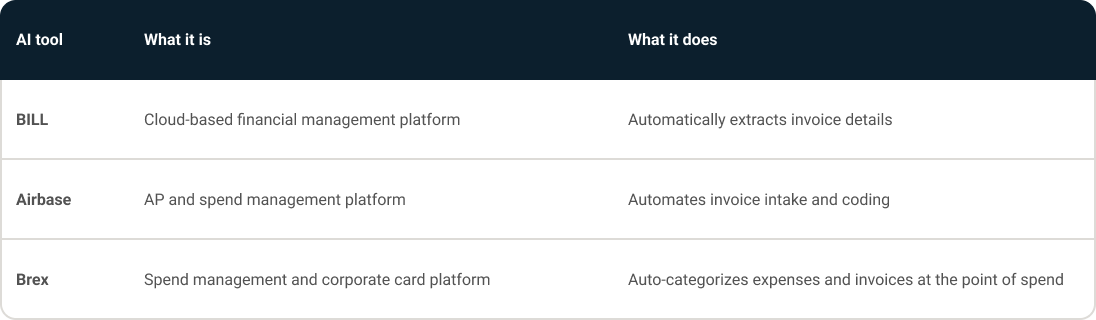
During our 1:1 discussions, some CFOs mentioned using their ERP, like Sage Intacct with embedded AI coding suggestions, to help with invoice coding. Others cited specific point solutions that they rely on, including BILL (a cloud-based financial management platform), Brex (a spend management and corporate card platform), and Airbase (an AP and spend management platform).
(Note: For the most up-to-date pricing for SMBs and Enterprise for AI and SaaS tools, check out our Marketplace.)
Every single invoice requires the same set of actions. Finance teams spend time searching for vendor details, referencing past invoices, and entering coding fields line by line. Even when the logic is predictable, the work is still manual.
And the cost of that manual work adds up quickly: According to a recent report from Ardent Partners on the State of ePayables, the average cost to process one invoice is $9.40 (with other estimates going as high as $16+ per invoice).
The more manual the work, the higher risk of human error. In the case of invoices being coded incorrectly, even small mistakes can have downstream consequences. A miscoded invoice often resurfaces later, during reconciliation or close, when it’s more time-consuming to track down and correct.
That creates a cycle of work and rework. Teams spend time entering data, then more time validating it, and then even more time fixing issues that slip through.
All this work tends to fall on finance teams that are already stretched. Because invoice coding is high-volume and deadline-driven, it can absorb a disproportionate share of time, leaving less capacity for analysis and higher-value work.
During high-volume periods, the pain becomes more acute. Many teams wind up absorbing the workload or having to add headcount. Some CFOs we spoke with reported hiring temporary support during peak periods just to keep up with coding.
AI tools change the equation. Instead of coding every invoice from scratch, finance teams start with AI-generated suggestions. These systems learn from historical invoice data and begin to recognize patterns: how vendors are typically coded, which projects they map to, and how similar invoices have been handled in the past.
As one CFO we spoke with described it, the tools “learn from each invoice, guessing the vendor and the project number.”
That shift matters because it removes the need to repeatedly look up and re-enter the same information. Instead of spending time on data entry, teams can focus on reviewing and confirming suggested coding. This means they’re catching issues earlier in the process rather than correcting them later during reconciliation or close.
To be clear, AI doesn’t replace human review. The CFOs we spoke with were emphatic on this point. Accuracy requirements in finance are too high to remove human oversight.
The CFOs we spoke with are evaluating the ROI of this use case in simple terms: Does automation cost less than the alternatives?
Independent research supports the ROI: According to Ardent Partners research, best-in-class finance teams who use automation see 78% lower invoice processing costs.
And one CFO we spoke with discussed the cost savings this way:
“We pay for AP automation instead of a temp — saving us the cost of hiring.”
CFOs are, of course, interested in saving money and creating efficiencies, but not at the sake of accuracy. That’s why the CFOs we spoke with validate ROI by checking that invoice coding remains near 100% accurate, that errors don’t surface during close, and that workflows stay consistent without increased oversight.
Before introducing AI into your AP workflow, finance teams need to:
This use case supports what we heard over and over in our 1:1 conversations with CFOs: Some of the most effective applications of AI in the finance function — and quickest wins — are simply to remove repetitive work.
AP invoice coding is obviously not the most strategic work, but it’s essential. By reducing the time spent on it, finance teams can redirect effort toward analysis, planning, and higher-impact tasks that require human judgment.
Download the full report to see all 7 AI use cases, including tools, costs, and real-world ROI from 30+ CFOs.
Want to make sure you’re getting the best price on AI and SaaS tools? Get started with SpendHound today for real pricing benchmarks from over 1,300 companies across 10,000+ vendors.
Report findings are based on 1:1 interviews with 30+ CFOs from December 2025 through February 2026. CFOs included in the study represent both SMB and enterprise companies ranging in size from 11 to 5000+ employees. They represent experience across a broad range of industries that include technology, financial services, software development, advertising, healthcare, education, hospitality, advertising, and travel. Some CFOs have been anonymized for the purposes of this report.
For information about our spend insights and pricing benchmarks, check out our full methodology.
Finance teams are using AI tools to automatically suggest invoice coding based on historical patterns. Instead of manually entering vendor details, project numbers, and GL codes for every invoice, teams review and approve AI-generated suggestions. This shifts the workflow from data entry to review and exception handling, reducing the time spent per invoice while keeping humans accountable for accuracy. According to CFOs interviewed for SpendHound's 2026 CFO AI Report, the tools most commonly cited for this type of work include Sage Intacct, BILL, Airbase, and Brex.
The most commonly cited tools for invoice coding in SpendHound's 2026 CFO AI Report are Sage Intacct (an ERP with embedded AI coding suggestions), BILL (a cloud-based financial management platform), Brex (a spend management and corporate card platform), and Airbase (an AP and spend management platform). The right choice of tools depends on whether a team needs full ERP functionality or a lighter point solution.
The primary benefits of automating AP invoice coding according to the CFOs we interviewed for SpendHound's 2026 CFO AI Report include reduced manual workload, lower labor costs, and faster invoice processing. Finance teams can reallocate time saved to higher-value tasks while maintaining high accuracy in coding.
CFOs in SpendHound's 2026 CFO AI Report measure ROI by comparing automation costs directly to the cost of alternatives which often includes the practice of hiring temporary staff during peak periods. Research from Ardent Partners finds that best-in-class finance teams using AP automation see 78% lower invoice processing costs compared to manual methods. One CFO we spoke with framed it simply: "We pay for AP automation instead of a temp." For the ROI to hold, coding accuracy needs to remain near 100% — which CFOs validate by monitoring whether errors surface during reconciliation and close.
High-volume, rules-based, repetitive workflows are the strongest candidates for AI automation. AP invoice coding is one clear example. Invoice coding follows predictable patterns that AI systems can learn quickly from historical data, like the same vendors, the same GL codes, the same project mappings. Judgment-heavy tasks — such as evaluating contract terms, managing exceptions with unusual context, or making accrual decisions — are less suitable for automation because they require contextual reasoning that current AI tools don't reliably provide.
The data for SpendHound pricing benchmarks comes from de-identified spend data from over 1,000 companies. This data is used to analyze and provide median pricing by company size, year-over-year trends, and negotiation insights. SpendHound's platform allows finance and procurement teams to see what similar companies actually pay for SaaS tools, which helps in building effective negotiations and reducing software spend. The platform is trusted by companies including ZoomInfo, Datavant, and Clear, and is designed to help customers gain confidence in every SaaS decision and reduce software spend by an average of 30%.


.webp)