Your cloud bill, finally in finance's language
See your AWS and Google Cloud spend in finance’s language, right next to your SaaS & AI spend. For AWS, track spend by service against budget and get alerted before the month closes.
The biggest line item, hidden to finance
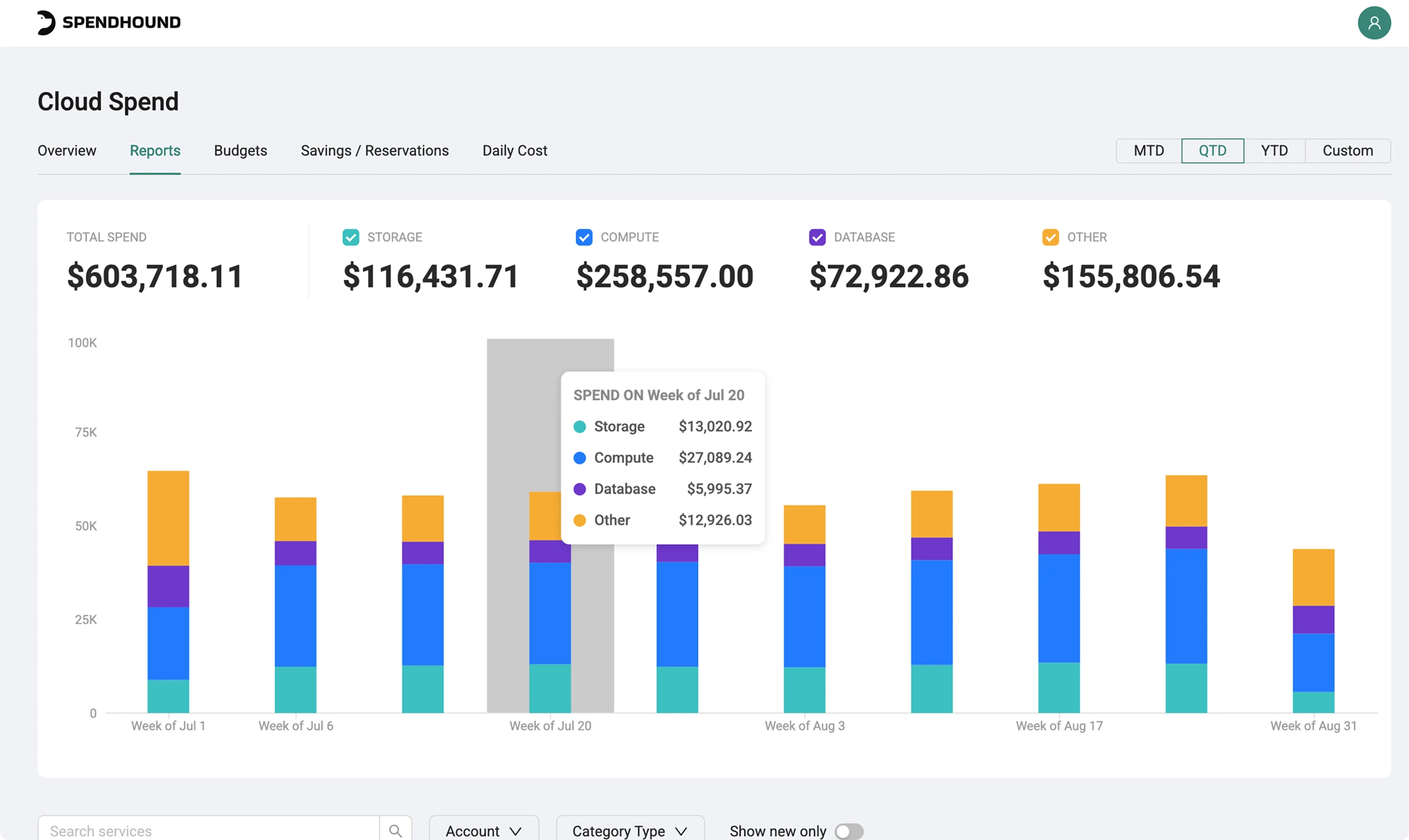
Cloud is one of the largest software costs on the books, and it's the one finance has the least visibility into. The data lives in a console built for engineers.
Finance teams need to see the number, tracked against actuals and updated daily.
Three steps to cloud visibility
Connect AWS or Google Cloud
AWS connects directly with read-only access to your Cost and Usage Reports. Google Cloud connects through GCP’s Detailed Billing Export to BigQuery, using a dedicated SpendHound service account. No agents to install.
See spend by service and against budget
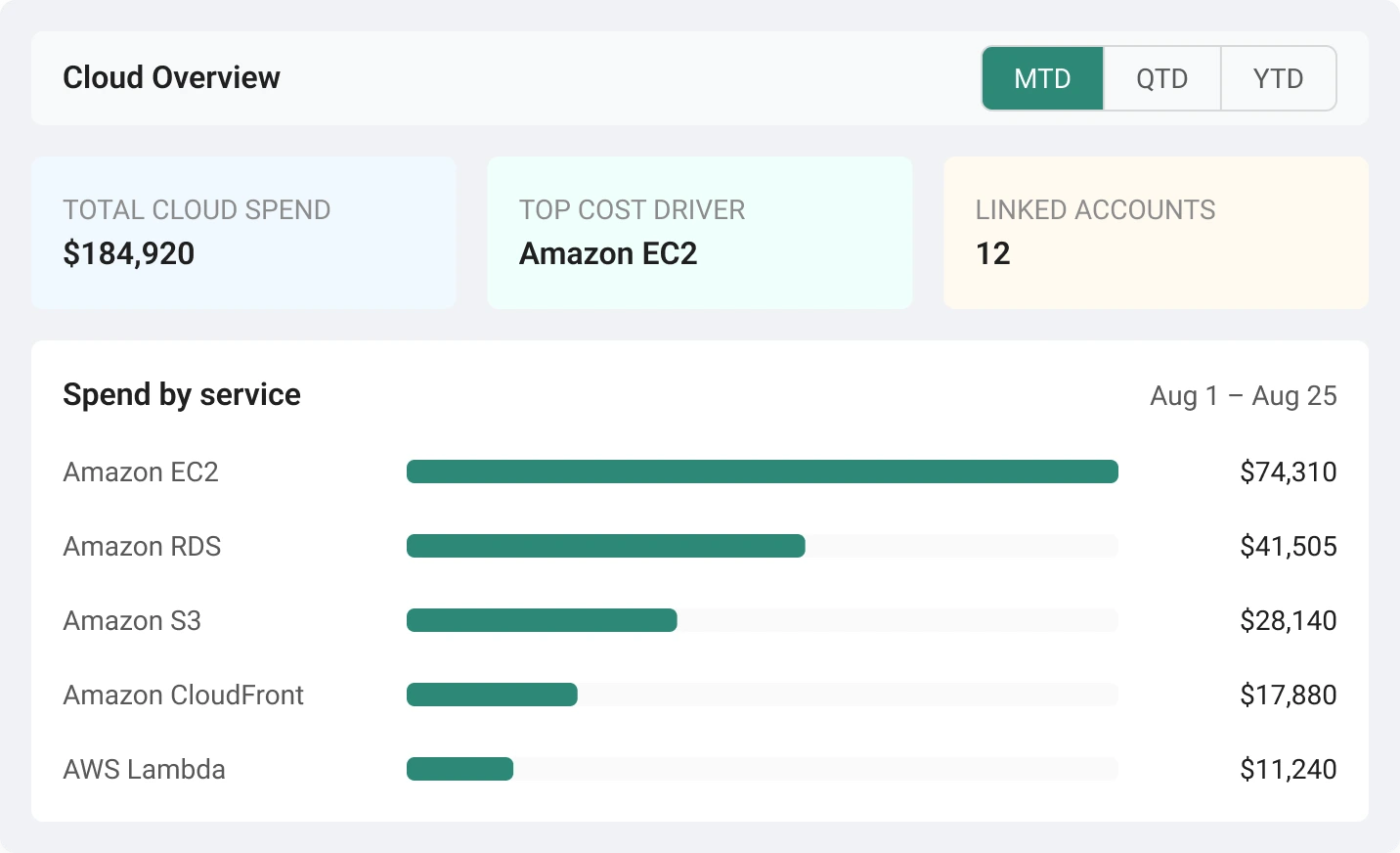
Spend and cost drivers across AWS and Google Cloud, plus a breakdown by AWS service. Set budgets by month, quarter, or year, tracked against actuals in real time.
Get alerted and act
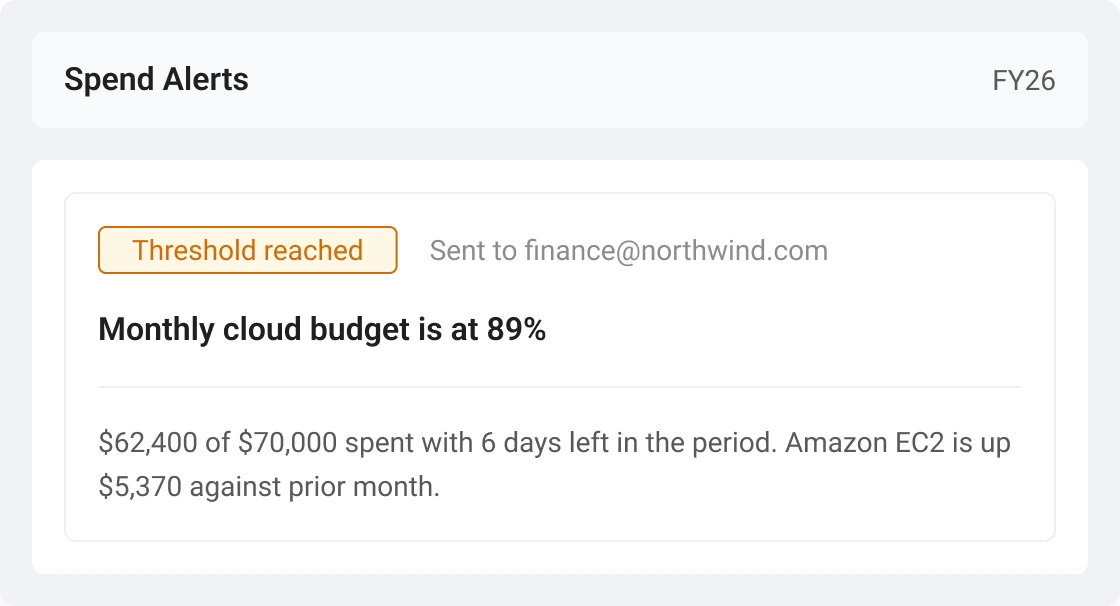
Automated alerts when spend nears or crosses your thresholds, plus a weekly summary, so you catch runaway spend early.
What you get
Cloud Overview
Total cloud spend, top cost drivers, and key accounts in one view. So you know where the money is going without opening the AWS or Google Cloud console.
Reports by AWS service
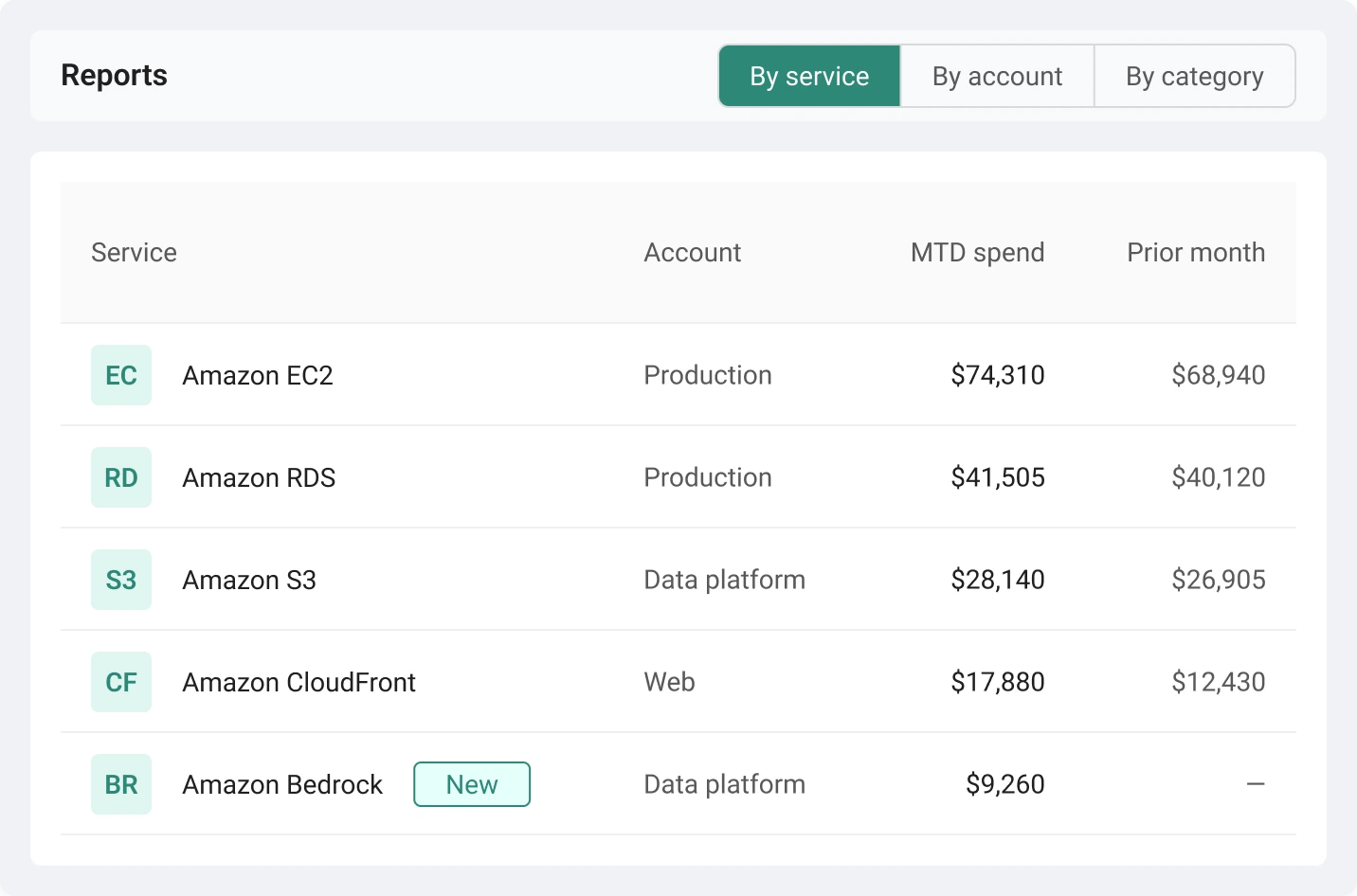
Available for AWS today. Google Cloud spend appears in your Cloud Overview.
Break spend down by EC2, S3, RDS, and more, with filters by account, category, or newly added services to spot unexpected activity and investigate it.
Cloud Budget Tracker + Spend Alerts
Set monthly, quarterly, or annual budgets and compare actuals in real time. Automated alerts fire when spend approaches or exceeds a threshold, and a weekly summary recaps spend, budgets, and anything unusual.
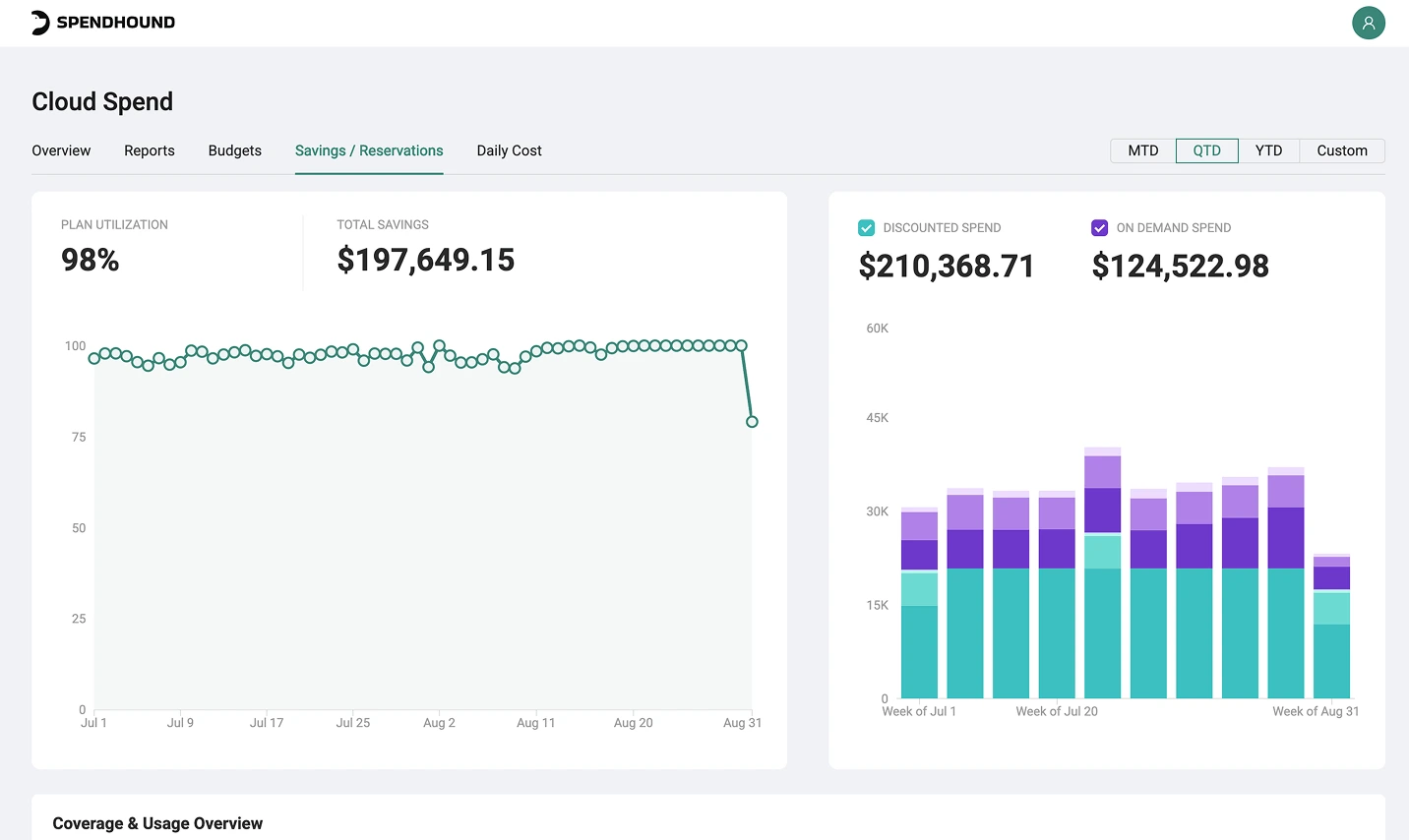
Savings Plans & Reservations
Available for AWS today. Google Cloud spend appears in your Cloud Overview.
Utilization and expiration detail for Savings Plans and reserved instances, so underused commitments surface early and renewal decisions get made on time instead of by default.
From reactive surprises to proactive control


Every cloud, SaaS & AI dollar under one roof
Cloud, SaaS & AI sit in the same platform, on the same renewal and budget workflow.
Get alerted about upcoming renewals, and compare your SKU-level spend across benchmarks from 1,500+ companies. Unlimited Procurement Expert support puts a real person on your bespoke benchmarking. For the deals worth handing off, Managed Negotiation adds a vendor-facing layer to any deal.

Finance-grade cloud visibility, at no cost
FinOps platforms are built for engineering teams and priced in the tens of thousands. Cloud Spend is built for the people who own the budget — and it's included free with SpendHound, at the same depth for every customer.
for companies under 1,000 employees.
for growing businesses, backed by a $150K+ savings guarantee.
pricing for enterprise organizations.

Read-only access, limited to Cost & Usage Reports.
A dedicated service account scoped to your billing export.

#1 SaaS Spend Management Software
Total visibility, built for finance, procurement & IT
For Finance
Track consumption daily, forecast against real usage, and catch spend trending the wrong direction before it hits budget.
See finance solutionsFor Procurement
Walk into every cloud and software renewal knowing your spend history, renewal dates, and what similar companies pay.
See procurement solutionsFor IT
Consolidate provider tracking, eliminate admin dashboard fatigue, and see team attribution for supported providers, all from a single view.
See IT solutionsYour questions, answered
How much does Cloud Spend cost?
Nothing on top of your existing plan. It’s free for companies with less than 1,000 employees and included for every customer through Enterprise, with the same functionality on each plan.
Which clouds do you support?
AWS and Google Cloud. AWS connects directly to your account and reads your Cost and Usage Reports. Google Cloud connects through GCP’s Detailed Billing Export to BigQuery. Each Cloud Billing Account connects separately. Azure isn’t supported yet.
What access do you need to my cloud accounts?
For AWS, read-only access limited to Cost and Usage Reports. For Google Cloud, a dedicated SpendHound service account with BigQuery Data Viewer, BigQuery Job User, and Storage Object User roles, so we can export and read your billing data from a Cloud Storage bucket you designate. We don’t touch your infrastructure or workloads in either cloud.
Do I need cloud or FinOps expertise to use it?
No. Cloud Spend is built for finance and procurement teams — spend by service, budget vs. actual, and alerts, without the console. Setup takes minutes and doesn't require engineering.
Is this a FinOps tool?
No. Cloud Spend gives finance visibility, budget control, and alerts on cloud costs. It isn't an infrastructure optimization tool and doesn't make engineering rightsizing recommendations.
How does this connect to the rest of my software spend?
Cloud spend sits alongside your SaaS and AI spend in the same platform, so budgets, reporting, and renewal conversations cover every software dollar in one place.
Stop seeing your cloud bill when it’s too late
Connect AWS or Google Cloud and see your cloud spend the way finance needs, in one place, alongside your SaaS & AI spend.
.svg)

Book time to chat with the
SpendHound team